
Doing Your Taxes with Free Turbotax Software [2025]
Oh, hi tax season. Even though I cover personal finance topics for a living, tax season still sneaks up on me every year. Even if you don’t run your own business or have complicated taxes, filing online can be intimidating. While more of a hassle than say, returning a package, filing your income tax online doesn’t have to be overly complicated, if you plan properly and leverage great technology, such as TurboTax free filing online.*
*Disclaimer: TurboTax free software is for simple tax returns only and not all taxpayers qualify
In the article below, I provide a Turbo Tax step-by-step guide to filing taxes online with the TurboTax free software and cover some common questions many of you have about doing your taxes yourself and the online filing process.
I recommend breaking down the entire tax process into smaller one- to two-hour chunks over two or three weekends prior to the filing deadline of April 15. The Turbo Tax step-by-step guide you’ll see below allocates tasks and to-do’s for each of these days over a three-week spread.
While this seems like a lot, trust me, it isn’t, and it will save a lot of headaches and stress if you work little by little, over time, rather than trying to cram it all in at the last minute. Here’s a great tax documents checklist from TurboTax that can help as well.
Here’s an example:
- Day 1 (income and expenses) – I double-check how much I made and make a list of all the W-2’s and 1099’s I’m set to receive for the tax year. As they come in, I check them off the list. (This year, I put them in a file until I was ready to look through them.) I also go ahead and download any investment income, plus documents for my mortgage, and make sure I have health insurance verification.
- Day 2 (file your taxes) – I calculate all of my expenses and things I want to deduct. I make sure my spreadsheets are accurate and that I have paper copies (in case of an audit) organized and in one place.
- Day 3 (final review) – I put it all together and hunt for missing pieces (if any).
Plus, the earlier you file, the sooner you’ll get your refund (if applicable)! How’s that for incentive?
Filing Your Taxes – Day 1
To Do’s:
- Make a checklist of expected income
- Record and file any receipts for expenses you plan to deduct
- Decide how you’ll file
- (If applicable) Sign up for a TurboTax free account.
Make a Checklist
If you’re the type of person who works for one company and that is your only source of income, great! Your checklist of expected income should be pretty short: just your W-2 from your full-time employer.
But if you own a side business or have multiple income streams, you are probably pulling out your hair wondering what W-2’s, 1099’s and other documents you’re waiting for.
This is why come tax time (although if you’re self-employed, you ideally do this throughout the year), I make a list of all the documents I’ll need:
- Who I worked for
- How much I made
- My mortgage interest payment tax documents
- Anything else I think I’ll need to show verification for.
I create a handy written checklist and cross items off as they come in. It helps keep me sane and allows me to track who I need to follow up with if I don’t receive something on time.
The due date for W-2’s and 1099’s is January 31, so if you don’t have a form by early February, follow up.
Compile Receipts for Deductions (What is a tax deduction?)
Deduction is a fancy word for “things that will lower your total taxable income.” Think: mortgage interest, child care, medical expenses or charitable donations (see more information here).
Everyone filing taxes in America gets a standard deduction based on his or her tax status: single, married filing jointly, married filing separately, or head of household. Due to the latest tax reform, people now qualify for a higher standard deduction than in years past. (Limits and information on this are described here.)
Essentially, if you’re single and think the total of all of your itemized deductions is less than $12,400, it benefits you to take the standard deduction, which eliminates the need for receipt chasing.
If, however, your deductions total more than that, you should itemize your deductions to lower your total taxable income.
If I itemize, do I need all of my receipts?
You can deduct expenses without a receipt, but I wouldn’t recommend it. If you get audited, you’ll have to prove that expense was indeed a tax write-off, and you could get into lots of trouble.
For the “average Joe” taxpayer with one employer, taking the standard deduction is fine. But if you’re self-employed or have some other element of your taxes you’re uncertain about, it’s best to keep as detailed records as you can. Here’s a great list from Bench.co of what to keep and when if you’re self-employed.
Decide How You’ll File
Here are the options for filing your taxes:
- Filing online yourself using a software platform (TurboTax free software is – in my opinion – the best, most intuitive in the industry)
- Hiring an accountant
- Walking into a tax firm (such as H&R Block) and having them work with you.
Full disclosure: I DIYed my own tax returns with TurboTax free software successfully until I used federal grant programs to fund my house in 2013. The complicated tax rebate I received for renovating a historic home made my head hurt, which is why I chose to engage with an accountant. It worked out great and made the process super easy for me, but the tax preparation did cost a couple hundred bucks.
(P.S. You’ll still need to compile everything to turn over to your accountant. Accountants don’t dig through receipts like you see in the movies.)
For people who have more straightforward finances (even if you have a side hustle), I recommend doing your own taxes. It is substantially cheaper.
Sign Up for a TurboTax Free Account
Here is an unbiased review of the benefits of TurboTax from NerdWallet, in case you’re on the fence.
How much is TurboTax?
TurboTax is completely free to file both a federal tax return and a state tax return, but only if you don’t need to file any schedules. (Here’s a list of schedules and why you may need to file them.) For most people with a simple tax return – with one W-2 and the standard deduction – the TurboTax free version works just fine.
Should you need to upgrade, yes, it is pricier than other professional tax software on the market, but I love how easy TurboTax software is to use. All plans also come with a 100% accuracy guarantee. n 2012, when I used TurboTax and ended up having to pay for a W-2 that was missed, they refunded me the full price for my filing that year.
How easy is it to use TurboTax?
Is it easier than just handing off papers to an accountant? No, but the cost savings are pretty significant because you can file your taxes, even if you’re self-employed, for as little as $90. You can even choose to pay for your tax preparation costs out of your federal tax refund. (A $40 Refund Processing Service fee applies for that payment method.)
When should I consider TurboTax Premium?
If you think your taxes are….uhm…. a bit more complicated (more complicated than a freelancer’s taxes, you say?), TurboTax has several iterations of their product, TurboTax Premium. Depending on what you need and the level of complexity of your taxes, these products were designed to provide live assistance from a credentialed tax expert, on-demand (TurboTax Live) or to provide a full-service experience where you just hand off your paperwork (TurboTax Live Full Service) and let TurboTax take care of it.
If you’re the “learn as you go” type (I am), you can go through the TurboTax Live Assisted Premium software and then sign up for “Expert Review” at the end. What this means is that once you’re done preparing your taxes, you can have a tax expert review your tax return for accuracy, then sign and file. (Normally, this is what an accountant would do for you to “certify” it has been officially prepared.)
Having an expert review generates peace of mind for you, and each of these service levels comes with the TurboTax Maximum Refund Guarantee plus a 100% Accuracy Guarantee.
Here’s what the screen for TurboTax Premium selection screen looks like.

Filing Your Taxes – Day 2
Next up on this Turbo Tax step-by-step is day 2. After you’ve gathered all the information you’ll need, it’s time to begin filing your taxes. Log on to your TurboTax account to get started. Below I’m going to go through how to file for beginners, and then do a second tutorial for people who are self-employed.
How to file with TurboTax free
First, create an account. You’ll be asked to fill in personal information (your name and address) and then to answer questions about your tax situation this year.

You’ll go through screen by screen, filling in the information related to you:
- Wages and income
- Deductions and expenses
- Health insurance
- Other tax situations (if applicable)
- And finally a federal review.


Pro Tip: You’ll have to fill out information and answer all of TurboTax’s questions, even if you’re certain you want to take the standard deduction. It’s a few screens, but they just want to double-check and make sure you aren’t missing out on any money.


Once you’re finished with your federal return, the software will use that information to pre-populate all the information on your state tax form. After double-checking all of that information, you should see a screen like this.

Then a final screen to double-check the results.

And then you’re clear to file!
Okay – all done! Skip to the conclusion of this article.
How to File Self-Employed Taxes with Turbo Tax step by step
Step 1 – Tell TurboTax about your tax situation.
As you can see, TurboTax is stepping up its game quite a bit, and you can now select a variety of options based on your tax situation. This is way more advanced than what they offered even just a few years ago, and I’m excited that there was a button for every scenario I encountered over the year, between my multiple streams of business and rental income.

When I did my 2018 return, I selected “Single,” “Own a home,” “Own a rental property,” “Maximize deductions” and “Own my own business/independent contractor.” PHEW!
Step 2 – Select your TurboTax free plan.
Based on what you’ve told the quiz about yourself and your filing status, TurboTax will recommend the type of product you should use.

Step 3 – Tell them more about yourself and your financial picture.
You can already see how easy and self-guided this is.
On the next two screens, you’ll answer questions about your marital status and the kinds of financial transactions you engaged in over the course of the year. One important thing to note is that if you are self-employed and did not work with a company as an employee, you won’t select the “I Had a Job” button.

Pro Tip: If you had one of those years where you worked a job at a company and then left to work for yourself, you’ll select the “I had a job” button and be prompted to enter in W-2 information later on in the “Personal” section.
Step 4 – Enter self-employment information.
At this point, TurboTax will do a “check-in,” which looks like this. If all looks good, continue. (But don’t worry, you can change it later if you need to!)
Step 5 – Finish entering your personal information into your TurboTax free account.
When you’re finished, TurboTax will recommend a filing status for you and do a summary of all of your personal information. If all looks good, click continue!

Step 6 – Choose how you’d like to enter your information on your TurboTax free account.
Okay, here’s where you get to pick and choose. In one option, you can have TurboTax guide you, or you can choose what you want to work on.
The one you choose really depends on whether you’re the type who sits down, files your taxes and has all the paperwork organized and ready to go so you can answer the questions (which, if you’re following this guide, you should be)!

If you’re working on your taxes little by little, you can choose your own sections to work on as the information becomes available to you.
Pro Tip: If this is your first time filing self-employed taxes, I recommend selecting the “walk me through everything” button, and if you don’t know something, you can come back to it later.
Over the next few pages, you’ll confirm your business name and address, and if you paid any wages. Wages apply if you have full-time employees you pay with a W-2 or if you pay contractors (they’ll need a 1099.) TurboTax has the option to create these for your staff if you haven’t already done so.
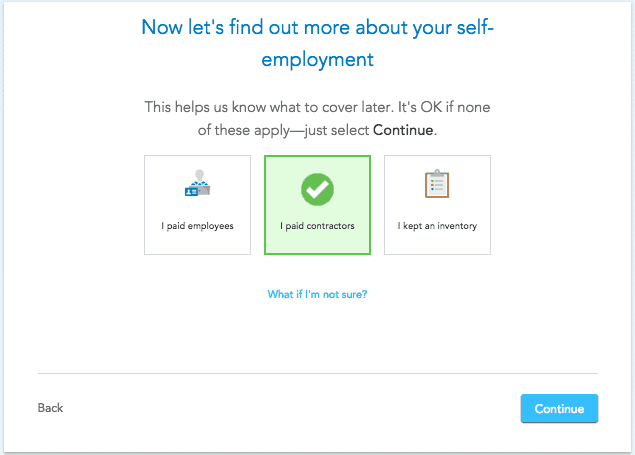
Pro Tip: If you’re unsure of something, TurboTax has a lot of links to click on with thorough answers to your questions. Each step of the process has tax advice links on the page, so you can proceed with confidence.
Step 7 – Enter your EIN, look up your business code and answer questions about your accounting method.
Keep going until you hit the business summary page. It will outline for you all the sections you still need to work on!
Step 8 – Enter in business income.
Here’s where it gets a little more involved. As a business owner, you should keep a simple Profit & Loss sheet totaling up how much you made and how much you spent on the business for each month of the calendar year. If you use online accounting software for invoicing and expense tracking, it should do this for you. I like to keep my own record, and I update it monthly. Here’s a great template, if you don’t already have one.

Pro Tip: If you freelance or own a blog business, enter all of the income you receive a 1099 for, then subtract that from your total annual income. Then claim the remainder as “General Income.”
Step 9 – Enter in if you have any inventory.

Step 10 – Enter in business expenses you’ll be claiming.
Let’s keep going in this Turbo Tax step by step guide! The software lists all of the “common” business deductions, so you don’t have to worry about remembering them all. TurboTax will walk you through both mileage and home-office deductions with ease.

Step 11 – Enter information about your business assets.

Step 12 – Review all the information and file.
Pro Tip: TurboTax really does make filing your self-employed taxes a snap, but the process will be a lot smoother if you organize your records – the P&L, the receipts, and the 1099’s (if any) – in one place before starting.
Conclusion
In a former life (before multiple businesses, kids, divorce, etc.) I used this Turbo Tax step-by-step guide myself. It’s what worked best for me, and I recommend doing it this way so it doesn’t get overwhelming and you’re not attempting to put it all together….all at once. How do you eat the tax elephant? One bite at a time!
But of course, if you feel your tax situation is more complex, reach out to an accountant or leverage TurboTax live resources.

Lauren Bowling is the creator of Financial Best Life. Writing about money since 2012 (formerly as L Bee and the Money Tree), Bowling is an award-winning blogger and money and real estate expert whose advice has been featured on CNBC, Forbes, CNNMoney, Elite Daily, Business Insider, Redbook, and Woman’s Day Magazine and more. After selling the site to a division of The Motley Fool in 2019, Bowling is now back as the owner and primary voice behind FBL and is excited to continue educating elder millennials everywhere about how to afford their best life.